How to connect Airbnb to a channel manager (2026 guide)
Connect Airbnb to a channel manager and three things happen at once. Your Airbnb calendar stops taking changes from you. Smart Pricing switches off. And your minimum stay rules start working the Airbnb way, which isn't the way they work on Booking.com.
None of this is a problem once you know it's coming. It only hurts when you find out from a guest.
What you get in return: one calendar for every channel, prices you change in one place, and Airbnb bookings that land in your PMS without anyone copying them over. For hostels there's one more question. Can a platform built around apartments sell a single bed in a 6-bed dorm? It can, with the right setup.
This guide covers all of it: the steps, the fees, what you control from where, and how to get dorm beds on Airbnb without overbookings.
We use the Areca channel manager as the example. It connects to Airbnb through a direct API connection. Most API-connected tools follow the same logic, so the guide is useful even if you use something else.
iCal or API: two ways to link Airbnb
There are two ways to keep Airbnb in step with your other channels.
iCal shares a calendar file that other platforms check from time to time. It only knows if a date is blocked, and it updates with a delay. Prices, minimum stays and guest details don't travel at all.
An API connection links your PMS or channel manager directly to Airbnb. Prices, availability and stay rules go out as soon as you change them, and bookings, changes and cancellations come back in on their own.
If you list on more than one channel, the API connection is the one you want. We compare both in detail in iCal vs. API connections.
Before you connect: a short checklist
A few minutes of preparation saves you from the most common connection errors.
- Your listings exist on Airbnb. With Areca, you create listings in Airbnb and then pair each one with a room type in Areca. The channel manager doesn't build listings for you.
- You can sign in to the Airbnb account that owns the listings. Airbnb connects through a sign-in, not a property ID. Changing your Airbnb password later won't break the connection.
- Your Airbnb account is complete. Missing host details, such as an unverified email, can block the connection.
- No other software is connected. Airbnb accepts one channel manager or PMS at a time. If another tool is linked, disconnect it first in your Airbnb settings, under privacy options.
- Your rooms and prices are ready in your PMS. In Areca, room types must exist before you connect, because they are what Airbnb receives.
- You've noted your current Airbnb settings. Write down your cleaning fee, extra guest fee, discounts and cancellation policy. After the switch, the fees and discounts are set in the channel manager, so you'll want them at hand.
Step by step: connecting Airbnb to Areca
Here is the full process in Areca.
1. Set up room types and prices
Create your room types and rooms and set your rate plans and prices. A dorm is a shared room type priced per bed. A private room is priced for the whole room.
2. Add Airbnb as a channel
Open Settings > Channel Manager, click Connect Channel Manager, then Add a channel and choose Airbnb. Pick the currency your prices will be sent in.
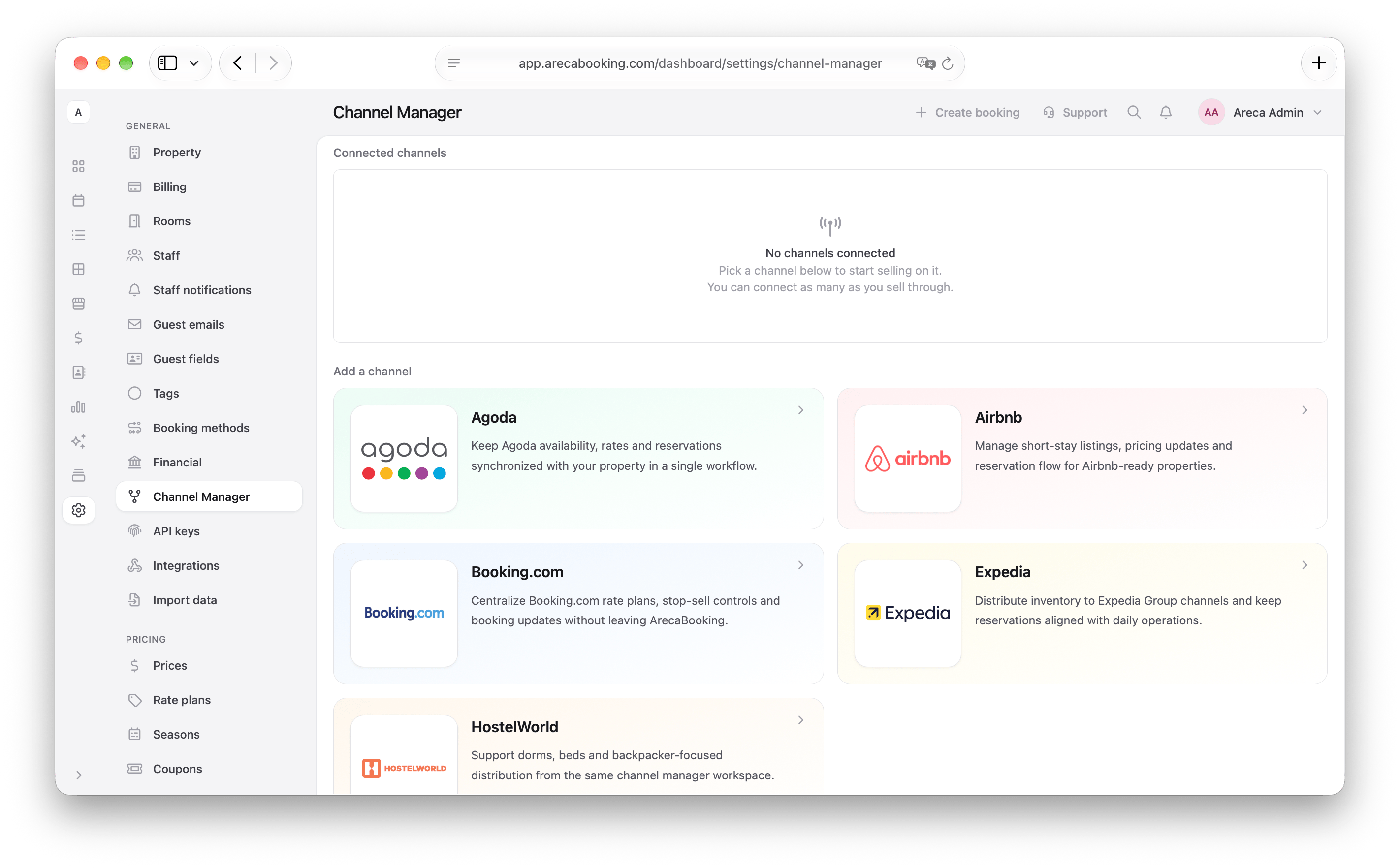
3. Sign in to Airbnb and approve
Airbnb opens in a small window. Sign in with the account that owns your listings and approve the connection. You land back in Areca with Airbnb connected.
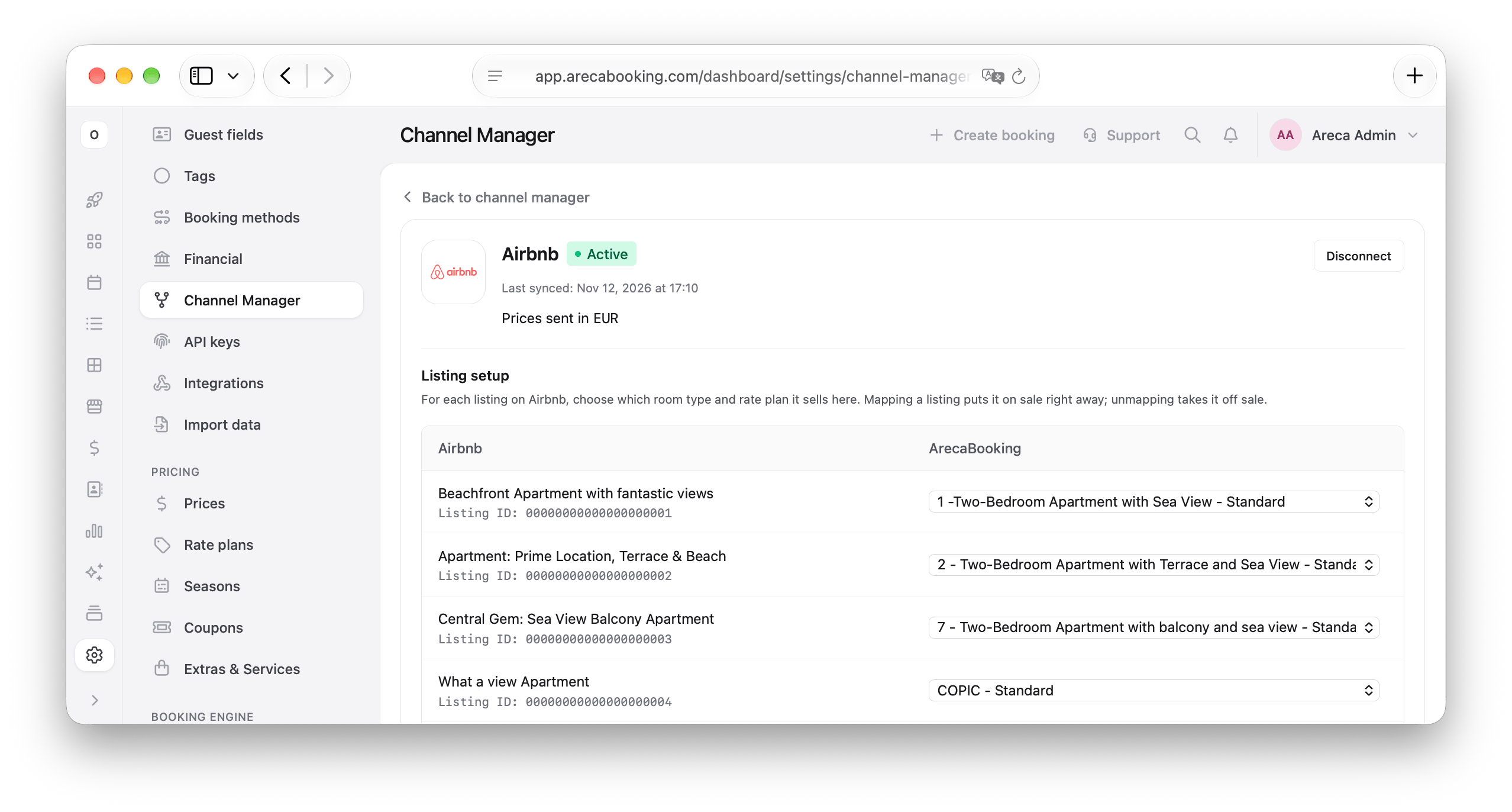
4. Pair each listing with a room type and rate plan
Areca shows your Airbnb listings. For each one, choose the room type and rate plan it sells. Pairing a listing puts it on sale right away, and unpairing takes it off sale. Each listing sells one rate plan.
5. Check the result on Airbnb
Open your Airbnb calendar for the next few weeks and compare it with Areca: prices, closed dates and minimum stays should match. Then search for your listing as a guest would, with real dates and a real guest count, and look at the total price.
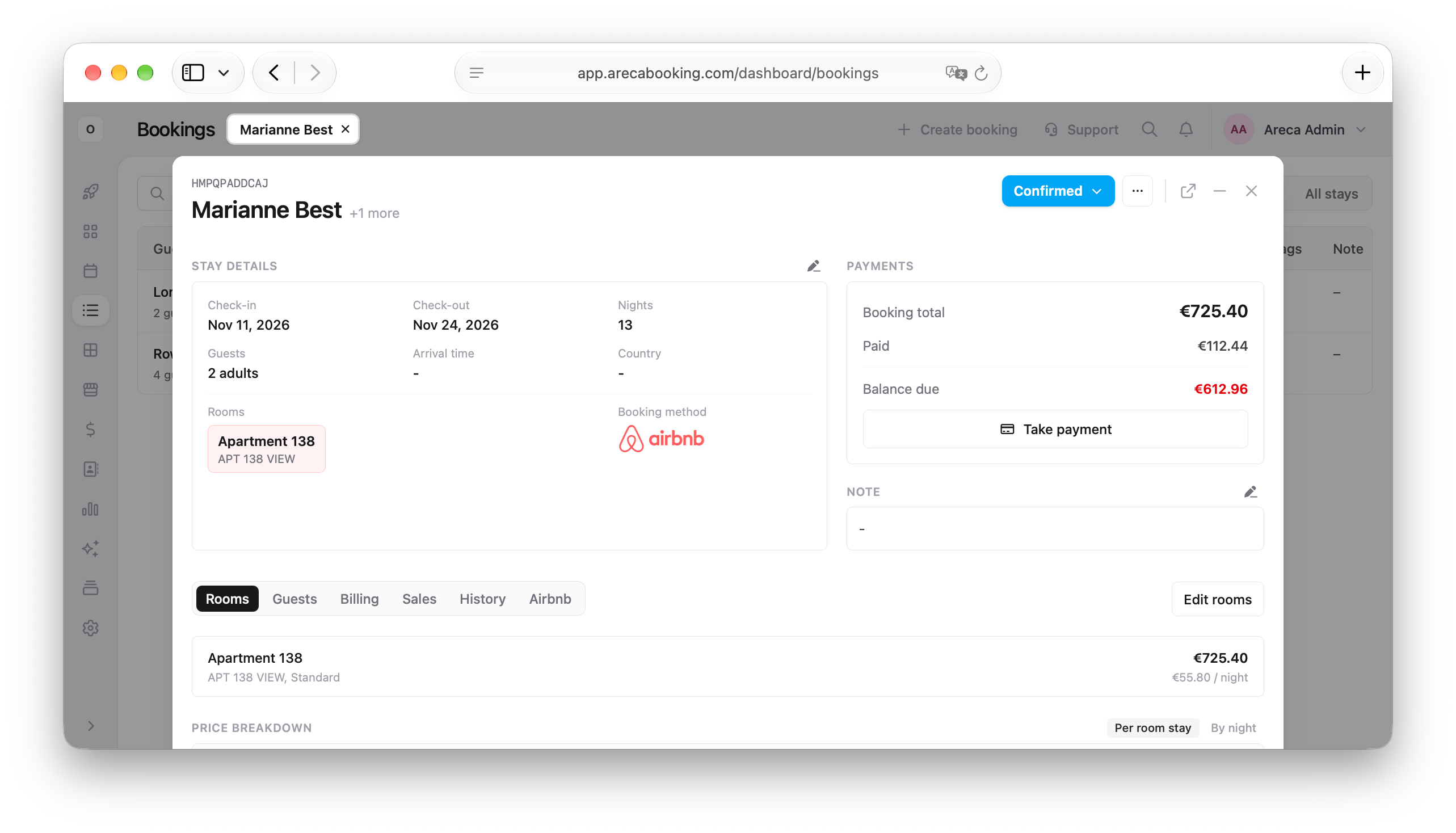
6. Watch the first bookings
New Airbnb bookings appear in Areca on their own, with an extra Airbnb tab showing the channel reference, who collected the payment and the channel commission. Check the first few against Airbnb to make sure prices and guest counts arrive as expected.
What changes on Airbnb after you connect
The connection moves some control away from Airbnb. Knowing this up front saves a lot of confusion later.
-
Prices and availability come from your channel manager.
If you change a price directly in Airbnb, the next update from your channel manager overwrites it. Make all price and availability changes in your PMS. -
iCal calendars go away.
Airbnb removes synced iCal calendars once a listing is connected to software. You don't need them anymore. -
Smart Pricing stops working.
Airbnb's automatic pricing doesn't run on software-connected listings. If you relied on it, plan your seasonal prices in your PMS before you connect. -
Stay rules follow Airbnb logic.
Airbnb checks the minimum stay only on the arrival day, and it does the same with the maximum stay. Say you set a 3-night minimum on Friday for a festival weekend. A guest arriving on Thursday can still book Thursday to Saturday, two nights that cover the festival, because Thursday has no minimum. To protect a period, set the rule on the days leading into it too.
What you control from the channel manager and what stays in Airbnb
| What | Where you manage it |
|---|---|
| Nightly prices | Channel manager / PMS |
| Availability and closed dates | Channel manager / PMS |
| Minimum and maximum stay | Channel manager / PMS |
| Cleaning fee, extra guest fee, guests included, weekly and monthly discounts | Channel manager |
| Bookings, changes and cancellations | Come into your PMS automatically |
| Photos, title, description, amenities | Airbnb |
| House rules | Airbnb |
| Cancellation policy | Airbnb |
| Guest messages and reviews | Airbnb |
| Payouts | Airbnb |
A good way to think about it: anything that changes day by day lives in your PMS, and anything that describes your place lives in Airbnb. Airbnb's new house rules policy is a good example of the second kind, and you'll keep editing it in Airbnb.
Airbnb fees: does a channel manager change what you pay?
No, not anymore. Every Airbnb host now pays the same single fee: 15.5% for most hosts, taken from your payout, with no service fee added for the guest. Connecting a channel manager doesn't change it.
This is fairly new. Airbnb used to have a second option, the split fee, where the host paid about 3% and the guest paid 14.1% to 16.5% on top at checkout. Hosts connected through software were moved to the single fee first, so for years connecting a channel manager meant a visible jump in commission, and many hosts put it off for that reason.
In 2026 Airbnb moved everyone else as well: hosts outside the European Economic Area on September 15, and hosts in the EEA and Switzerland on October 13, to the single fee model. The split fee no longer exists, so the fee is the same with or without a channel manager.
Check your Airbnb prices
If you set your Airbnb prices back when you were on the split fee and haven't changed them since, you now earn less from each booking. Take a room listed at €100 a night.
| Before (split fee) | Now, same price | Now, adjusted price | |
|---|---|---|---|
| Your nightly price | €100 | €100 | €115 |
| Guest pays (before taxes and cleaning) | €114 to €117 | €100 | €115 |
| Airbnb takes from you | €3 | €15.50 | €17.83 |
| Your payout | €97 | €84.50 | €97.18 |
With the same price, guests pay less than before and you earn less. To get your old payout back, raise the Airbnb price by around 15%. The guest pays roughly what they paid before, because the fee is now inside your price instead of added at checkout.
In Areca, you can do this without touching your other channels: create a derived rate plan called "Airbnb" at +15% of your standard rate and pair your listings with it. Your direct and Booking.com prices stay the same.
Airbnb limits to plan around
A few things work differently on Airbnb than on Booking.com or Expedia:
-
One rate plan per listing.
Airbnb accepts one price per listing per night. You can't offer a flexible and a non-refundable rate side by side on the same listing the way you do on Booking.com. -
One extra guest price.
Airbnb prices a listing as a base price for a set number of guests plus one extra guest fee. Every additional guest pays the same amount. You can't charge one price for the second guest and another for the third. -
Length-of-stay discounts.
Weekly and monthly discounts are set in the channel manager. Airbnb's own admin supports more options, from 2 to 60+ nights, than most channel managers send.
None of this is a reason to avoid Airbnb. It just means your Airbnb setup will be a little simpler than your Booking.com one, and that's fine.
Selling hostel dorm beds on Airbnb
Hostels often assume Airbnb is only for apartments. It isn't. Airbnb has a shared room listing type and describes it directly as a bed in a shared room in a professionally managed hostel. It does take a bit more care than a private room.
How to set it up
-
Create one listing per dorm type, not per bed.
It's tempting to list each bed separately, but a single-bed listing only shows up in searches for one guest, so friends travelling together never find it. One "6-bed mixed dorm" listing that fits 6 guests is easier to find and easier to manage. -
Set the property type to Hostel and the listing type to Shared room.
Hostel isn't on the first list Airbnb shows when you create a listing. Choose Hotel there, and in the next step, where Airbnb asks what type of place guests will have, pick A shared room in a hostel. You can also change it later in the Listing editor, under Your space > Property type. Hostels follow Airbnb's standards for hotels and hospitality businesses, so the listing may be reviewed before it goes live.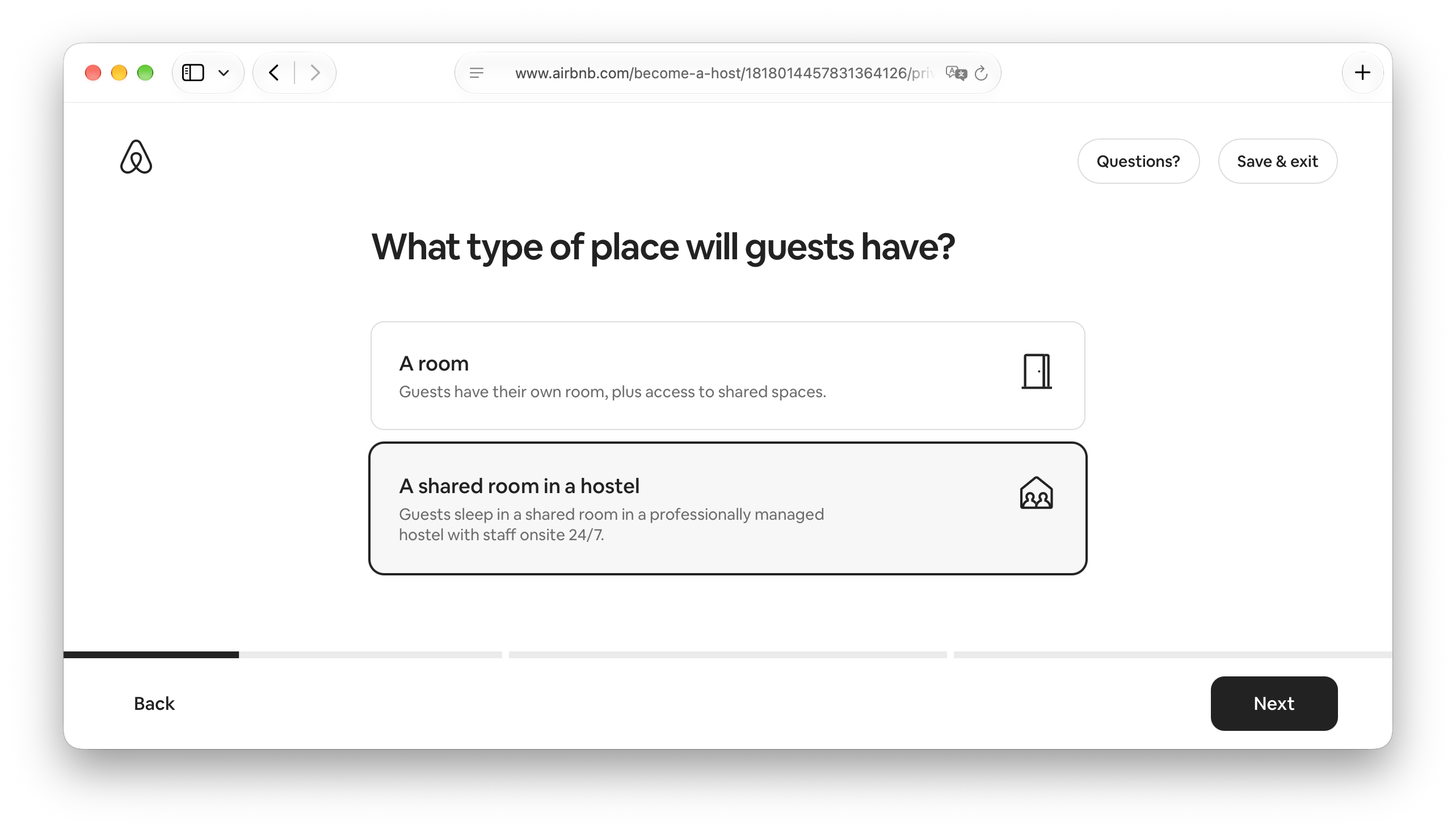
The property type matters for availability. Airbnb accepts a count of more than one unit only for hotel-style property types, so a dorm listed as a house or apartment can't receive the number of free beds. With the right property type, your channel manager sends how many beds are free, and the listing stays bookable until the last one is gone.
-
Price it per bed.
In Areca, shared rooms are already priced per bed, and the dorm goes to the channel manager as a room type with its total bed count. In the channel manager, set the listing to include one guest and the extra guest price to the price of one bed. A group of three then pays for three beds. -
Use separate listings for separate dorms.
A female-only dorm, a 4-bed and a 10-bed dorm are three listings. Guests care about the difference, and so do your reviews. -
Name it clearly.
"Bed in 6-bed mixed dorm" in the title saves you from guests who expected a private room. Airbnb guests are used to homes, so be explicit about bunk beds, shared bathrooms and lockers.
What happens when a group books
Airbnb sends one booking for the whole group, and the beds are taken out of the available count. When the booking arrives in Areca, the group's beds are placed in the same dorm, so friends sleep next to each other instead of being spread across rooms.
The limits
The extra guest price doesn't follow your seasons. The base price updates every night from your PMS, but the extra guest price is one fixed amount on the listing. If a bed costs €25 in February and €40 in August, a group in August pays €40 for the first bed and the fixed amount for the rest. Some ways around it:
- set the extra guest price close to your high-season bed price and accept that groups pay a bit more in winter,
- update it twice a year when your seasons change,
- cap the maximum guests on the listing at 2 or 3 and send larger groups to a private room.
Fewer search results. One listing per dorm means one spot in Airbnb search per dorm type. For most hostels that's a fair price for simpler management.
Private rooms are a separate story. List them as private or hotel rooms, priced per room. If you sell the same room both ways, for example a 4-bed room that's a private quadruple for families and a dorm for backpackers, your PMS has to keep both in step. We explain how in managing private rooms and dorm beds in one system.
Is it worth connecting Airbnb to a channel manager?
For most properties, yes.
It's worth it if:
- you sell on Airbnb and at least one other channel, including your own website,
- your rooms sell quickly in high season, where every hour of iCal delay is a risk,
- you run a hostel or a hybrid property and need bed-level availability,
- you want to change prices once instead of in three different extranets.
It may not be worth it if:
- you rent one apartment, only on Airbnb, and never plan to add another channel,
- you rely on Airbnb Smart Pricing and don't want to manage prices yourself.
For years, the higher fee was the main reason to stay unconnected. Now that every host pays the same 15.5%, that reason is gone. What's left is a simple question: how many places do you want to update every time a price changes?
Frequently asked questions
Does Airbnb charge more if I use a channel manager?
No. Since October 2026, all Airbnb hosts pay the same single fee, 15.5% for most hosts, taken from the payout. Before that, hosts using software had to pay this fee, while others could stay on the split fee, where the host paid about 3% and the guest paid the rest at checkout.
Can I keep Airbnb Smart Pricing after connecting?
No. Once prices come from your channel manager, Airbnb Smart Pricing stops working. Your prices are set in your PMS or channel manager instead.
Can I connect two channel managers to the same Airbnb account?
No. Airbnb accepts one software connection at a time. Disconnect the old tool in your Airbnb settings before you connect the new one.
Do I still need iCal links?
No. The API connection replaces them, and Airbnb removes synced iCal calendars when a listing is connected to software.
Can a hostel sell dorm beds on Airbnb?
Yes. Create one shared room listing per dorm type, set the property type to Hostel, and price it per bed. A channel manager then sends the number of free beds, so several guests can book the same dorm.
Can one guest book several beds in a dorm through Airbnb?
Yes. Airbnb sends one booking for the whole group, and the guest pays the base price plus the extra guest price for each additional person. The extra guest price is one fixed amount, so set it with your seasons in mind.
Where do I edit photos and descriptions after connecting?
In Airbnb. The channel manager handles prices, availability, stay restrictions and bookings. Listing content, house rules, the cancellation policy, messages and reviews stay in Airbnb.
Connecting Airbnb with Areca
Areca is a PMS, channel manager and booking engine for independent hotels, guesthouses and hostels. The channel manager connects to Airbnb, Booking.com, Expedia, Agoda, Hostelworld and other OTAs through a real-time API, so one booking anywhere updates availability everywhere. Dorm beds and private rooms live in one calendar, which makes Areca a good fit for hostels and mixed properties.
For step-by-step setup details, see the channel manager docs.