10 things to look for when switching your Property Management System
Switching your Property Management System is one of those decisions that feels straightforward until it isn't. You sit through a polished demo, everything looks clean and fast, and then three weeks after go-live your receptionist is clicking through five screens to move a guest to a different bed.
Most PMS platforms are sold on features. What you actually need to evaluate is behavior: how the system handles real work, under real pressure, on a Saturday morning when the hostel is full and three guests want to change rooms at the same time.
This guide covers the things worth testing before you sign anything.
1. How fast is it to move a reservation?
This is the most underrated test you can run during a demo, and it takes about two minutes. Ask the sales rep to move a guest from one room to another. Then ask them to do it again for a group of four.
A good PMS should let you drag and drop on the timeline view, or do it in two clicks from the reservation. A bad one will ask you to cancel the booking, refund the payment, create a new one, re-apply the rate, and re-send the confirmation. That sequence happens dozens of times a week in a busy property, and every extra click is time your staff is not spending with guests.
Watch for:
- Does the move preserve all booking details automatically (rate, source, notes)?
- Does it trigger a re-confirmation email automatically, or give you the option?
- Does it update the channel manager inventory in real time?
- Does the system stay fast when moving multiple bookings or a group booking?
Red flag: If the demo shows a "move" feature but it actually duplicates and archives the original booking, ask how the guest-facing history is handled. Some systems create two records and reconcile them behind the scenes, which causes confusion in payment history and reporting.
Moving a reservation should feel smooth and intuitive, not like a workaround. Look for a system that treats this as a core function, not an edge case.
2. What does the front desk view actually show?
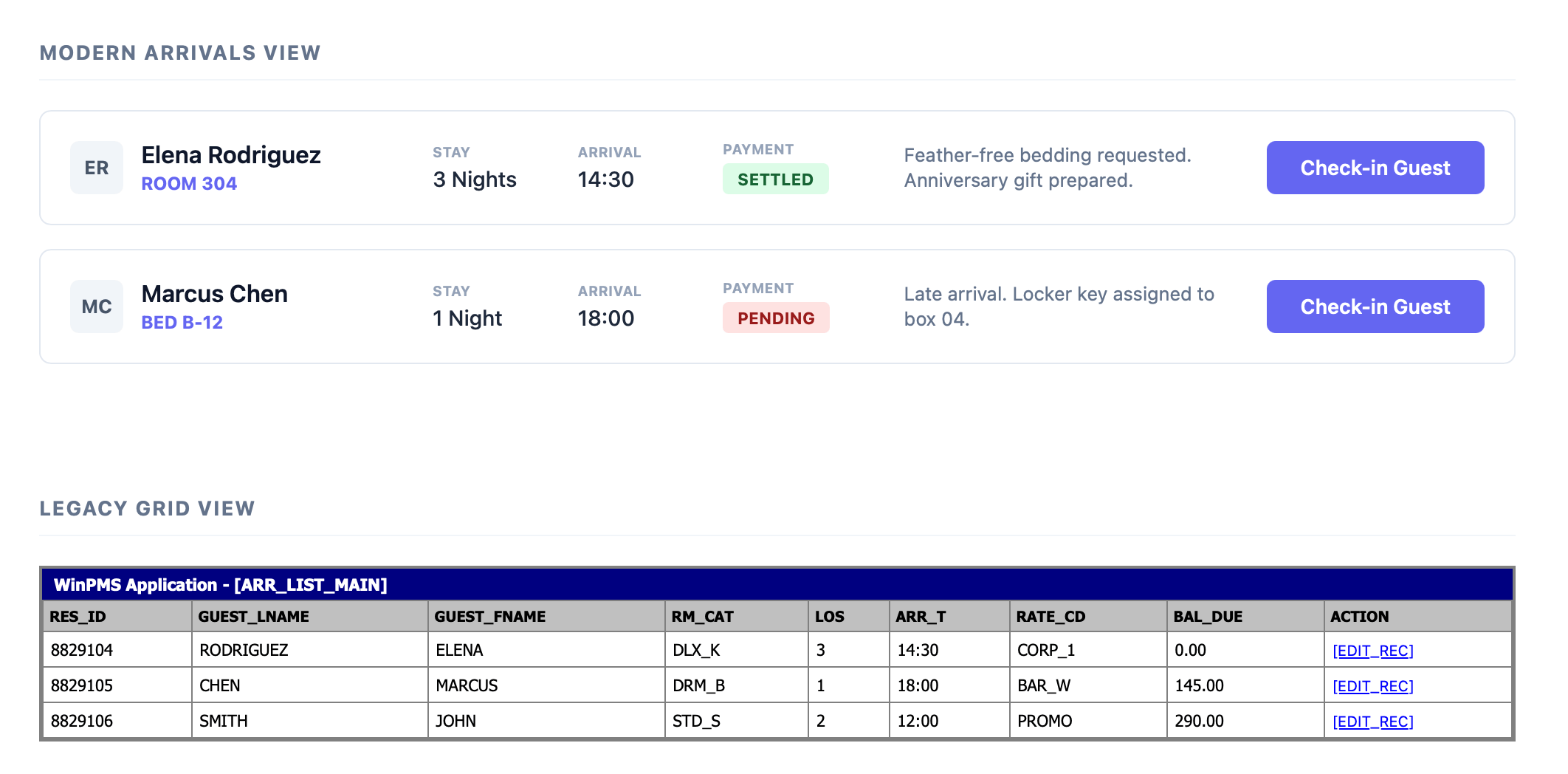
Open the arrivals list for tomorrow and ask yourself: does this tell me what I need to know, or does it just tell me something?
A useful arrivals list shows, at a glance: the guest name, room or bed number, number of nights, check-in time if collected, payment status, and any notes or special requests. A poor one shows booking ID, room type code, and a "view" button that opens a new page.
The same logic applies to the timeline (also called the room plan or Gantt view). This is where your team lives. It should be readable at a glance for a fully booked property, color-coded in a way that makes sense (paid vs. unpaid, checked-in vs. not), and zoomable between day view and week view without losing context.
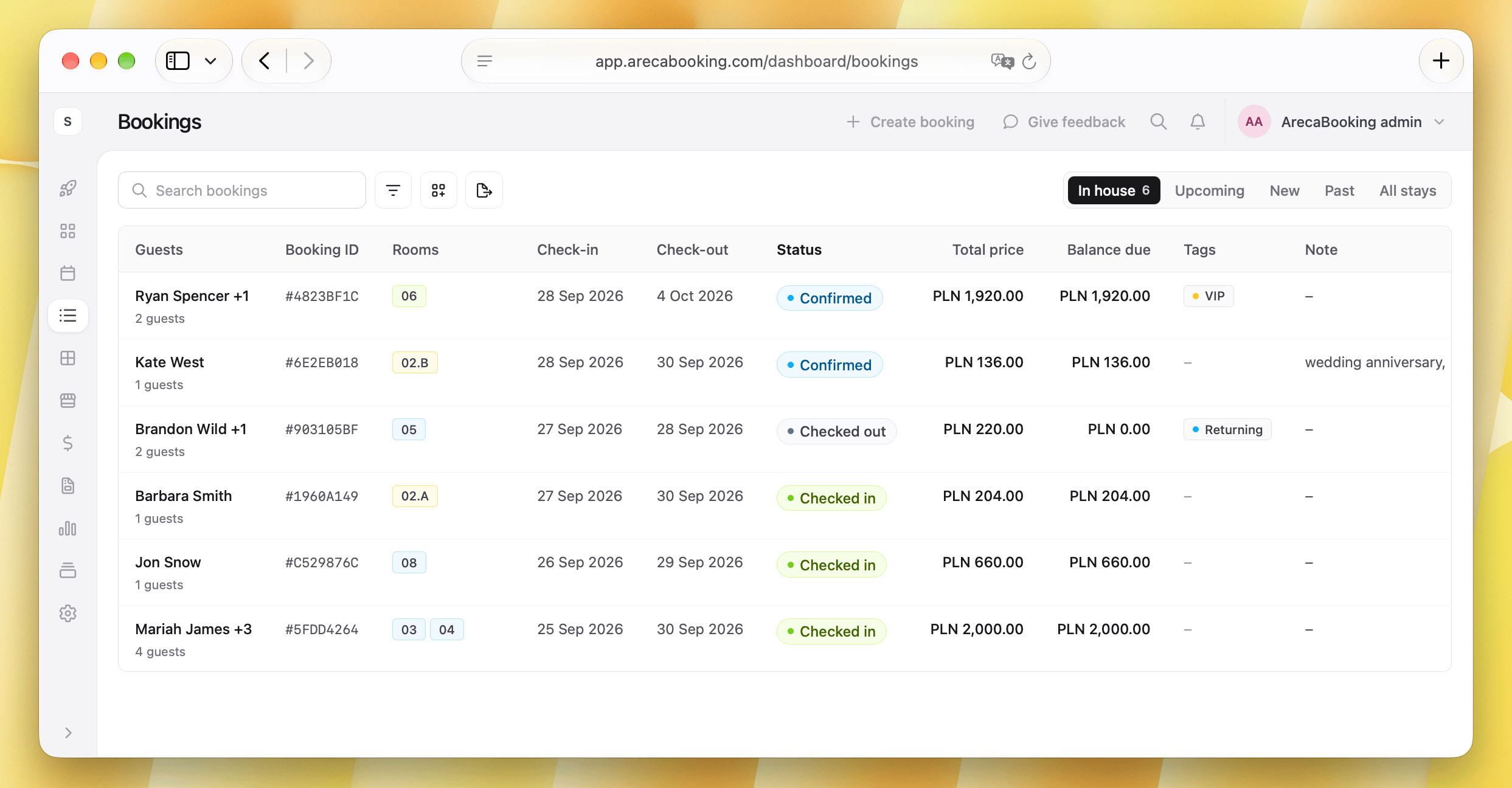
A specific thing to test: Filter the arrivals view by "not yet checked in, arriving today." If that filter requires more than two clicks, or does not exist, that is a workflow your staff will have to solve manually every single day.
The front desk view is not just a list of bookings. It is the operational dashboard for your busiest team. If it doesn't show the right information in the right way, it creates extra work and errors every day.
3. Is the interface consistent across sections?
This sounds like a minor UX complaint. It is actually a significant operational risk.
In many PMS platforms that have grown through acquisitions or years of patched development, different sections of the system work differently. The reservations module might save changes automatically. The rates module might require you to click "apply" and then "confirm" in a modal. The housekeeping section might use a completely different navigation pattern.
This inconsistency means your staff can never build reliable muscle memory. They have to stay cautious and deliberate in every section, which is slow and causes errors.
Test this by: Asking a new member of staff to perform three tasks in different modules without guidance. Watch where they hesitate, where they look for a button that is not where they expected it, and where they accidentally do the wrong thing because the interface behaved differently than it did two screens ago.
Poor interface means slow interface. In a busy property, every second counts. Look for a system that is designed holistically, not just a collection of features.
4. Does it show you information you actually need for management?
There is a difference between a system that has reports and a system that gives you useful management information.
A "reports" section that requires you to export to Excel and build your own pivot table every time you want to know your occupancy by room type last month is not a management tool. It is a data export tool.
What you want is a dashboard where you can, in under 30 seconds, answer: What is my occupancy this week vs. last week? What is my revenue per bed tonight? Which room types are underperforming? Where are my bookings coming from this month?
Ask to see the management dashboard in the demo, not the reservations view. Many systems are built for front desk operators and treat owners and managers as secondary users. If the manager view is the same as the receptionist view with a few extra menu items, that is a problem.
For hostels specifically, you want bed-level occupancy data, not just room-level. A six-bed dorm showing 67% occupancy and a private double at 50% occupancy require very different responses. The system should make that visible without a custom report.
Management information is not a nice-to-have. A good PMS should give you insights that help you make decisions, not just data dumps that you have to analyze yourself.
5. How good is the API?
If you plan to connect anything (a channel manager, a payment gateway, a dynamic pricing tool, a door lock system, a POS terminal for your bar), the API quality decides if those integrations actually work reliably or just sort of work most of the time.
Things to check:
- Is there a real REST API with documentation? Ask for the developer docs link. If the documentation is a PDF last updated in 2021, that is a signal.
- Does it use webhooks for real-time events? A system that only pulls data on a schedule (e.g., syncing every 15 minutes) will cause lag in your channel manager, which means double-bookings during high demand.
- What are the rate limits? A heavily throttled API slows everything down when you scale.
- Who can access it? Some systems lock the API behind an enterprise plan or charge per-integration fees. If you want to build a custom integration later, know the cost upfront.
Even if you are not technical, ask these questions and watch the sales rep's reaction. A well-built modern system will have a confident, specific answer. A legacy system with a bolted-on API layer will hedge and suggest you "talk to the integrations team."
API is a must have in 2026. If a PMS doesn't have a robust API, it is not just less flexible, it is more likely to cause operational issues as you grow and need to connect more tools.
6. What happens during check-in, step by step?
Ask the vendor to walk you through an actual check-in for a guest who made a reservation on Booking.com, paid online, and has a special request note.
Count the screens. Count the clicks. Notice if the payment status is visible without opening a sub-menu. Notice if the special request is visible on the same screen as the check-in action, or if you have to navigate to the booking notes first, then come back.
In a well-designed system, check-in is one screen: you see the guest, you see the room, you see payment confirmed, you click check in. Done. In a poorly designed one, it is a workflow with confirmations at each step, designed to prevent errors but actually creating them through fatigue.
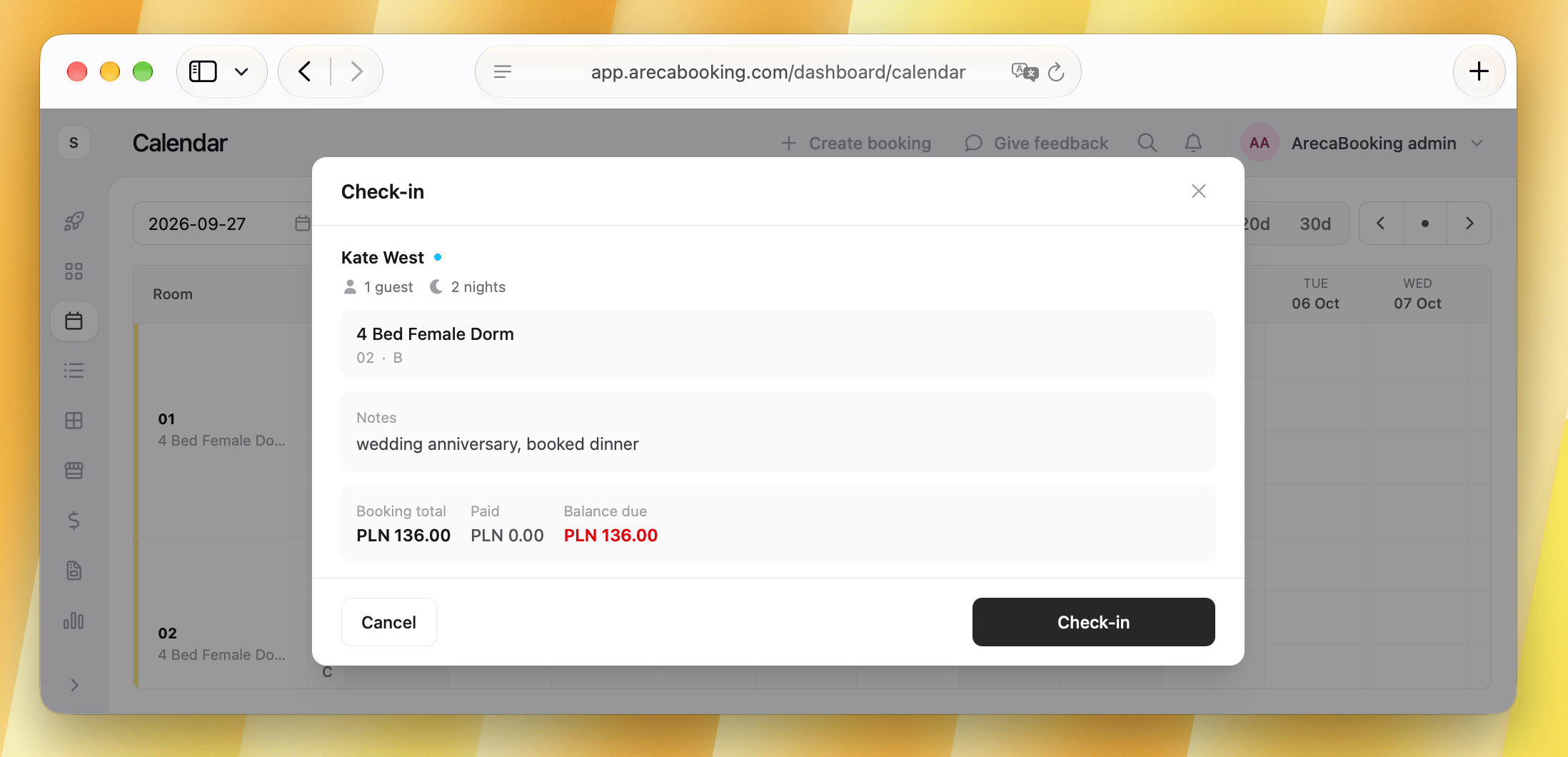
Check-in is the most common and time-sensitive workflow in your property. A good PMS should make it fast and error-proof, not slow and complicated.
7. How does it handle payments?
Payment handling is where many otherwise decent PMS platforms fall apart.
You want to understand:
- Where is the money? Can you see, at a glance, which reservations have been fully paid, partially paid, or not paid? Can you filter by payment status?
- Is the payment timeline clear? For a reservation taken three months ago with a deposit, then a balance collected two weeks before arrival, can you see that history in one view?
- What happens with refunds? Can a receptionist process a partial refund without involving a manager or logging into a separate payment portal?
- What payment gateways does it support? Some PMS platforms are locked to a single payment provider. If that provider has higher fees than Stripe or Adyen, or does not support your currency well, you are stuck with it.
A particularly important edge case: ask what happens when a guest's card fails on a scheduled charge. Does the system notify someone automatically? Does it flag the booking? Or does it silently fail and leave you with an unpaid reservation you only discover at check-in?
8. How is housekeeping managed?
This section is often rushed through in PMS demos, which is exactly why you should ask about it specifically.
A good housekeeping module shows, in real time: which rooms are dirty, which are ready, which are being cleaned now, and which have a same-day check-in arriving in two hours. It should be usable on a phone by the cleaning team without needing to sit at a computer.
For hostels with shared dorms, it should show individual bed status, not just room status. A dorm where beds 1, 2, and 4 checked out but beds 3, 5, and 6 are staying is a common scenario that requires the system to track at the bed level.
Ask: Does the housekeeping view update automatically when a guest checks out, or does someone need to manually change the room status? If a member of cleaning staff finishes a room and marks it clean on their phone, does that update the front desk view instantly?
Housekeeping should give you real-time visibility into room status and cleaning progress. Look for a system that treats this as an integral part of operations, not just a side module.
9. What does the training and onboarding actually look like?
Every PMS vendor will tell you their system is "intuitive" and "easy to learn". Ask them to prove it.
Specifically, ask:
- How long does onboarding take for a new property?
- Is there a self-serve help center (up to date and comprehensive), or does everything require a support ticket?
- What does training look like for a new receptionist who joins six months after go-live?
The second question matters more than the first. Your initial onboarding might be supported by a dedicated specialist. But in six months, when you hire a new person and need to train them yourself, is there documentation good enough to do that without calling support?
A practical test: Before signing, try to find the answer to a specific operational question using only the vendor's help center. Something like "how do I set a minimum stay restriction for a specific date range". If you can find the answer in under three minutes, the documentation is adequate. If you end up in a 20-tab loop or find a forum post from 2019 as the top result, plan accordingly.
Good documentation and training resources are essential for long-term success. A PMS that relies on support tickets for basic questions is a red flag.
10. What does the migration actually involve?
This is the question most people ask last, when they should ask it second.
Switching PMS means migrating your data: guests, historical bookings, payment records, rate plans, room configurations, and potentially your channel manager mappings. In practice, some of that data will not transfer cleanly, some will require manual re-entry, and some (particularly payment records) may not transfer at all due to PCI compliance restrictions.
Ask the vendor:
- What data can be imported, and in what format?
- Who is responsible for the migration: your team, their team, or a third party?
- What is the realistic downtime or parallel-running period during the switch?
- What happens to historical reservations? Can you still view a booking from two years ago in the new system?
A vendor who is honest about the effort involved in migration is more trustworthy than one who says "it's easy." Migration is never easy. What you want is a realistic plan, clear ownership, and a timeline that accounts for your busiest periods.
Migration is a project, not a switch. Plan for it accordingly, and make sure you have the support you need to get through it without losing data or disrupting operations.
The question behind all of these
Every point above is really asking the same thing: was this software designed by people who understand how a property actually operates, or by people who understand software?
The gap between those two things is visible in the details. It is visible in how the housekeeping view works on a phone. It is visible in how many clicks it takes to move a guest: two or ten. It is visible in a manager dashboard that answers the questions you actually have, instead of just showing you tables.
Before committing, ask to run a full day scenario: a check-in, a room move, a late checkout, a no-show, and an end-of-day report. If the system handles all of that smoothly, you are probably in the right place.
If you are evaluating PMS options for your property, Areca is built specifically for independent properties. It handles both private rooms and dorm beds in one system, offers a built-in booking engine and channel manager, and is designed to be fast at reception. You can join the waitlist and see it for yourself.